User Management
Customers with Pay Hub access can independently manage user permissions and access through the Access Evo platform's built-in user management system.
This self-service approach enables administrators to control team access, assign appropriate roles, and maintain security without requiring external support.
Administrative Capabilities
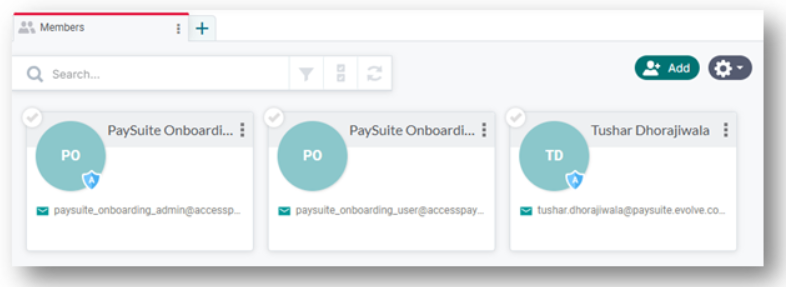
Organization administrators have comprehensive user management capabilities through the Access Evo Members application.
Administrator Functions
Organization administrators can perform the following user management tasks:
User Overview: View all organization members with their current roles and access permissions
Team Growth: Invite new team members with customized access levels and product permissions
Role Management: Assign and modify user roles across different Access platform applications
Account Maintenance: Deactivate user accounts when team members leave or change roles
Payment Hub Role Assignment
Role Configuration
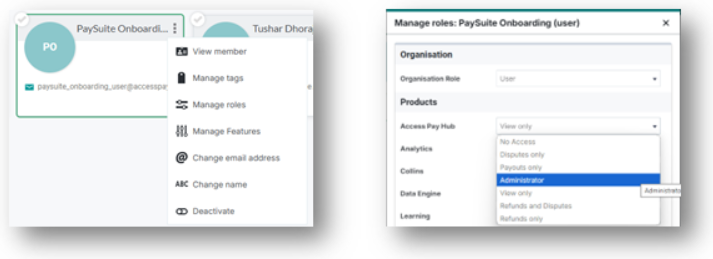
Pay Hub access is managed through role-based permissions using the Members application's role management interface.
Available Roles
Different role levels provide varying degrees of access to Pay Hub functionality:
Administrator: Complete access to all payment management features, payouts, and user management capabilities
View only: Access to view payments
Refunds and Disputes: Access to view payments, perform refunds, and dispute management
Refunds only: Access to view payments and perform refunds
Disputes only: Access to view payments and dispute management
Payouts only: Access to view payouts
No Access: No access to the Pay Hub
Important Considerations
Feature Limitations
Payment Management Scope: Available functionality is determined by Stripe embedded components and Access PaySuite permission configurations
Export Capabilities: The Stripe Payout component does not currently support transaction export functionality for payouts
Technical Requirements
Browser Compatibility: Access Identity has been thoroughly tested and optimized for Google Chrome. While other browsers may work, Chrome is recommended for optimal performance and reliability
Security Standards: All user management activities are logged and audited through the Access platform's security infrastructure
Best Practices
Role Assignment: Assign the minimum necessary permissions to maintain security while enabling productivity
Regular Reviews: Periodically review user access and roles to ensure appropriate permissions
Security Monitoring: Monitor user activity and promptly deactivate accounts for departing team members
Training: Ensure new users understand their role limitations and available functionality before granting access
Getting Help
For assistance with user management or role configuration, administrators can access support resources through the Access platform or contact your integration support team.