Direct Debit
Alongside card payments, ecommerce customers can pay by Direct Debit. The Direct Debit client lets a customer set up a Direct Debit instruction to pay, capturing their personal and bank details, validating the account, and presenting the Direct Debit Guarantee before the instruction is created.
The Direct Debit client is presented next to the card client as a Direct Debit tab in the checkout, so the customer can choose how they want to pay.
The Direct Debit client mirrors the card client, so a host application subscribes to the same set of events for either payment method.
Payment Journey
The customer completes the Direct Debit set-up in three steps, with the amount to pay shown at the top throughout.
1. Enter details
The customer provides their personal details and bank account details.
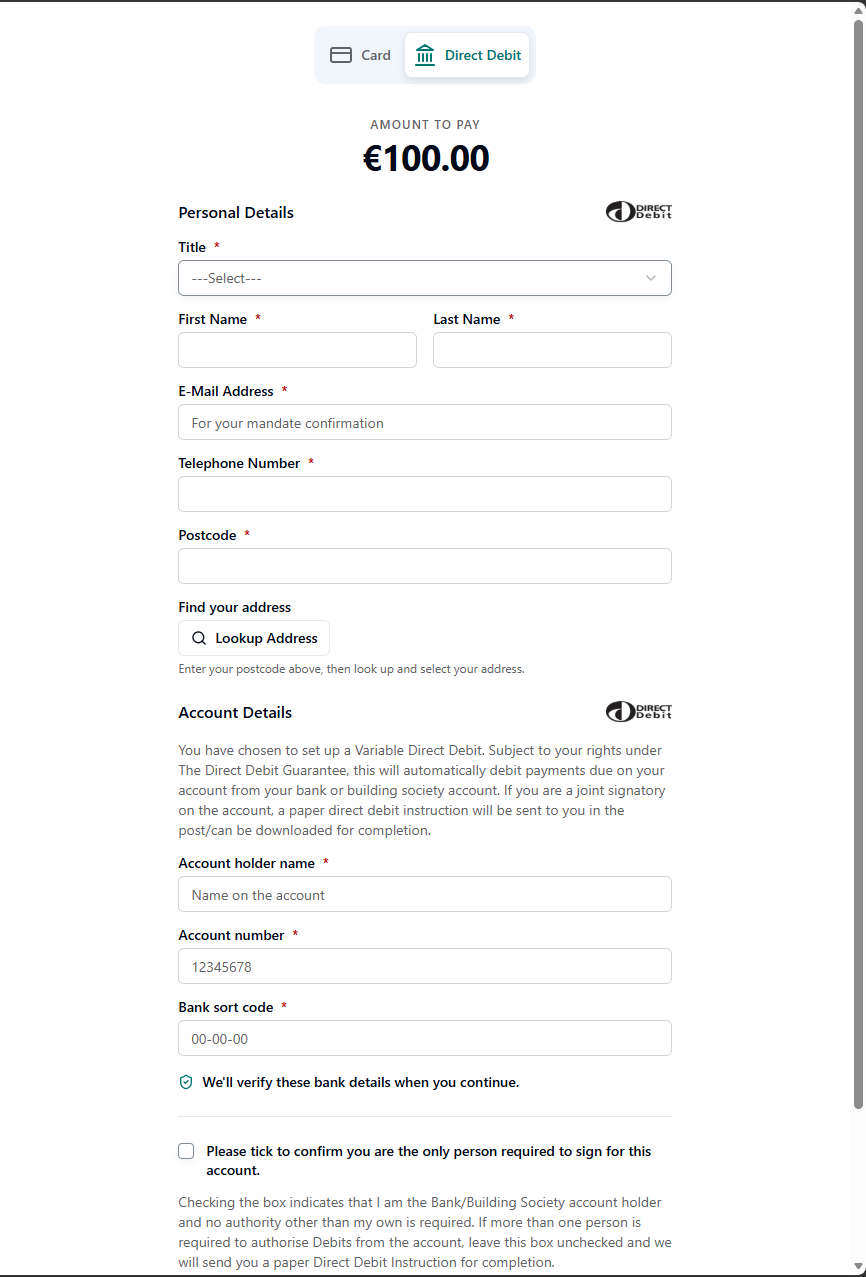
Personal Details
- Title
- First Name and Last Name
- E-Mail Address — used for the mandate confirmation
- Telephone Number
- Postcode with Lookup Address — the customer enters their postcode and selects their address
Account Details
- Account holder name
- Account number
- Bank sort code
The bank details are verified with a modulus check when the customer continues. The customer must also:
- Tick to confirm they are the only person required to sign for the account. If more than one signature is required, the box is left unchecked and a paper Direct Debit Instruction is sent for completion.
- Agree to the Terms and Conditions.
2. Confirm your details
The customer reviews their personal and bank account details, including the Service User Number, and reads the Direct Debit Guarantee before confirming.
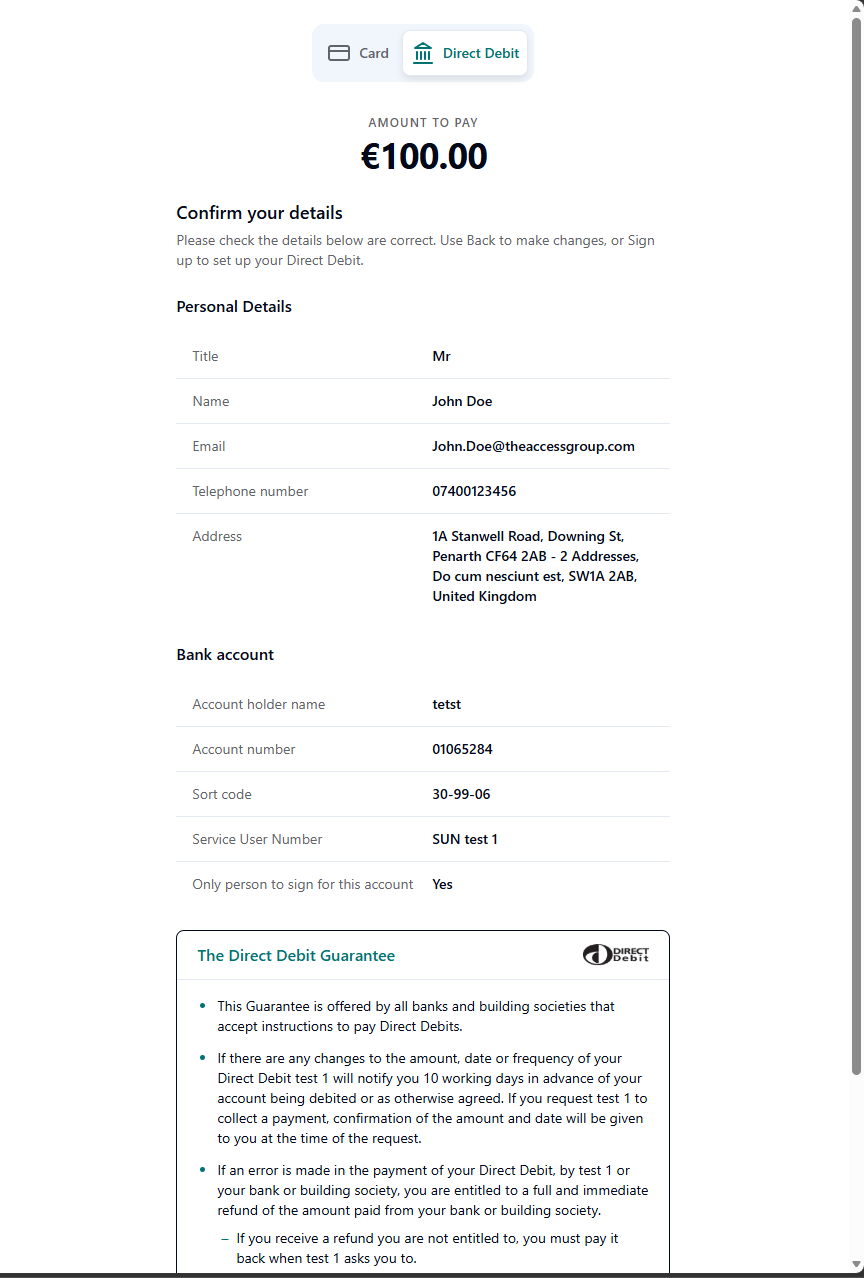
Selecting Sign up and Pay creates the Direct Debit instruction. Back returns to the details step to make changes.
3. Completion
Once the Direct Debit is set up, the customer sees a confirmation with the payment reference, first payment date and a summary of the mandate. A confirmation email is sent, and the payment is protected by the Direct Debit Guarantee.
Features & Key Benefits
- Set up Direct Debit at checkout: Customers can pay by Direct Debit without leaving the payment flow.
- Bank account validation: Sort code and account number are verified with a modulus check before the mandate is created.
- Address lookup: Customers find and select their address from a postcode.
- Prefill support: Known customer details can be pre-populated to reduce friction.
- Direct Debit Guarantee: The guarantee is presented before the customer confirms.
- Mandate confirmation: A confirmation is emailed to the customer once the Direct Debit is active.
Prefilled Data
Known customer details can be passed in to pre-populate the form. The customer can edit any pre-filled value. Supported fields:
- Title, first name, surname
- Email, telephone number
- Address (address lines, town/city, county, postcode, country)
Integration Flow
- Create the transaction: The host provides the transaction details (client, amount, customer reference and any prefill).
- Render the client: The Direct Debit client renders as a tab alongside the card client.
- Customer completes the details: The customer enters and confirms their details; bank details are validated before confirmation.
- Direct Debit is created: On sign up, the mandate is created and the customer sees the completion screen.
- Host is notified: The client fires events the host listens for to track progress and completion.
Events
The Direct Debit client fires the same events as the card client, so a host can subscribe once for either payment method:
| Event | When it fires |
|---|---|
loaded | The client has loaded. |
ready | The form is mounted and ready for input. |
signUpStarted | The customer commits to signing up, so the host can lock the payment method choice. |
transactionComplete | The Direct Debit was set up successfully. Carries the signed result. |
transactionFailed | The set-up attempt failed. |
transactionError | A correctable or load error occurred (the customer can retry). |
renderError | The client could not render — for example invalid prefill data. |