Ecommerce Payments
OnAccess provides a hosted payment page solution for processing ecommerce payments. It manages PCI compliance for secure cardholder data capture and transmission, with optional tokenization for future transactions.
info
For technical integration documentation refer to the OnAccess HiPPo Ecommerce docs
Hosted Payments (HiPPo)
The hosted payment page renders in two formats:
- Order details payment page
- Simple payment page
Order Details Payment page
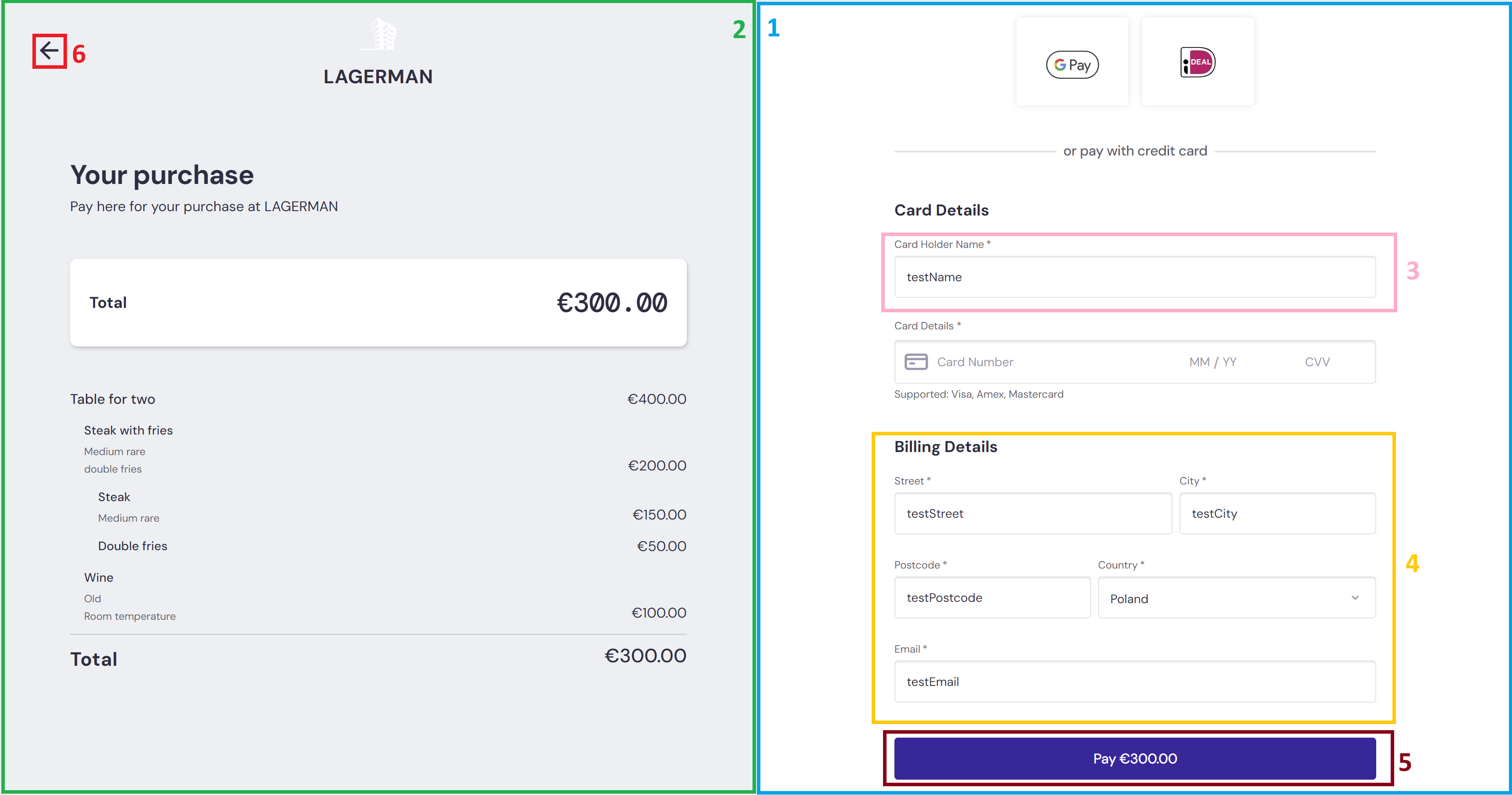
This page displays order information alongside a secure payment form for cardholder details.
| Item | Description | |
|---|---|---|
| 1 | Payment form | Always rendered. Used for simple payment flows without order details. |
| 2 | Order Details | Transaction information being processed. |
| 3 | Card Holder Name | Cardholder name field. Can be pre-populated via API. |
| 4 | Billing Details | Billing address and email fields. Can be pre-populated via API. |
| 5 | Action Button | Processes the payment. Displays "Submit" for card validation or "Pay Currency & Amount" for payment authorization. |
| 6 | Cancel Button | Cancels the session and redirects to the client system. |
Simple Payment page
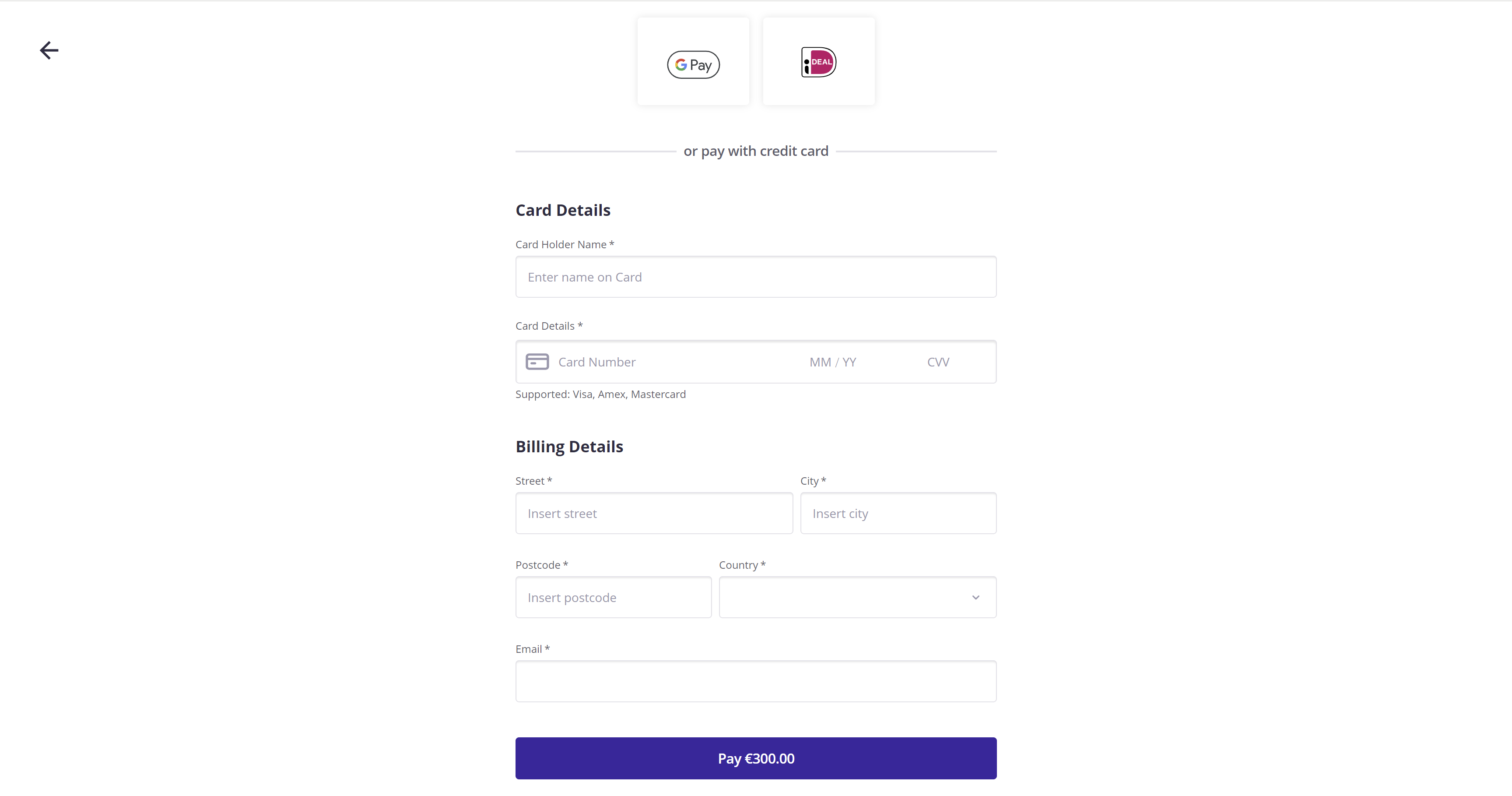
This page displays only the secure payment form for cardholder details.
Features & Key Benefits
- Payment and Validation Transactions: Process payment captures or card validations
- PCI Compliance: Hosted page manages sensitive payment data, reducing compliance burden
- Digital Wallets: Apple Pay and Google Pay support (payments only)
- Secure Checkout: PCI-compliant hosted payment experience
- Webhook Notifications: Real-time transaction status updates
- Customizable Experience: Pre-fill customer and order details
- Multi-Currency Support: Process payments in multiple currencies
Customization Options
Customize the hosted payment page experience through:
- Pre-filled Data: Pre-populate known customer information to reduce friction
- Order Details: Display itemized purchases for transparency
- Redirect URLs: Define post-payment destination pages
- Locale: Set payment page language (where supported)
Mobile Responsiveness
The hosted payment page adapts automatically to mobile devices:
- Mobile-optimized input fields and keyboards
- Touch-friendly buttons and controls
- Responsive layout for all screen sizes
- Mobile payment method support (Apple Pay, Google Pay)
Accessibility
The payment form includes accessibility features:
- Screen reader-compatible label associations
- Keyboard navigation support
- High contrast mode compatibility
- Clear error messaging
Integration Flow
- Create Session: Send POST request with transaction details
- Receive Payment URL: API returns unique payment page URL
- Display to Customer: Redirect customer to payment URL
- Customer Completes Payment: Customer enters and submits payment details
- Receive Notification: Webhook delivers transaction result
- Redirect Customer: Customer redirects to success or cancel URL
Getting Started
- Obtain your
ClientIdandAPI Keyfrom your Account Manager - Build your integration for your supported workflows
- Test integration in sandbox environment
- Implement webhook notifications for transaction updates
- Deploy to production with production credentials