Multi Product Onboarding
Overview
Multi product onboarding enables a customer to be onboarded onto two or more products concurrently, completing the onboarding journey once.
In the absence of this capability, a customer purchasing EPOS and Accommodation would be required to complete data capture, credit risk assessment and Know Your Customer (KYC) checks separately for each product. Under multi product onboarding, the products are grouped into a bundle. A merchant is still created for each product; however, the customer completes a single journey, and the information provided is applied to every product within the bundle.
Two routes onto multiple products are available:
| Route | When it applies |
|---|---|
| Create New Bundle | The customer purchases two or more products prior to onboarding and completes a single journey covering all of them. Refer to Net new customer bundles. |
| Upsell later | The customer has already been fully onboarded on one product and purchases a further product subsequently. An additional merchant is created for the new product, reusing the assessment already held. Refer to Upselling an onboarded customer. |
In both cases, the manner in which the products are assessed is governed by a single rule:
A bundle is assessed against the highest risk product it contains. All products within the bundle are assessed under a single credit risk workflow — that of the highest risk product, rather than that of the product sold first.
Consequently, a customer completes no more and no less assessment than the highest risk product within the bundle requires.
Benefits
| Benefit | Description |
|---|---|
| Single journey | The customer completes data capture, credit risk assessment and KYC once, rather than once per product. |
| Consistent assessment | The bundle is assessed at the highest risk level it contains, so the outcome is unaffected by the order in which the products were sold. |
| Faster activation | Every product within the bundle is activated on the basis of a single approval. |
| Reduced repetition | The customer is not required to provide the same business details on multiple occasions. Details captured once are applied to every product in the bundle. |
Starting a bundle
Multi product onboarding is initiated from the Sales Onboarding Manager, alongside the existing merchant management journey.
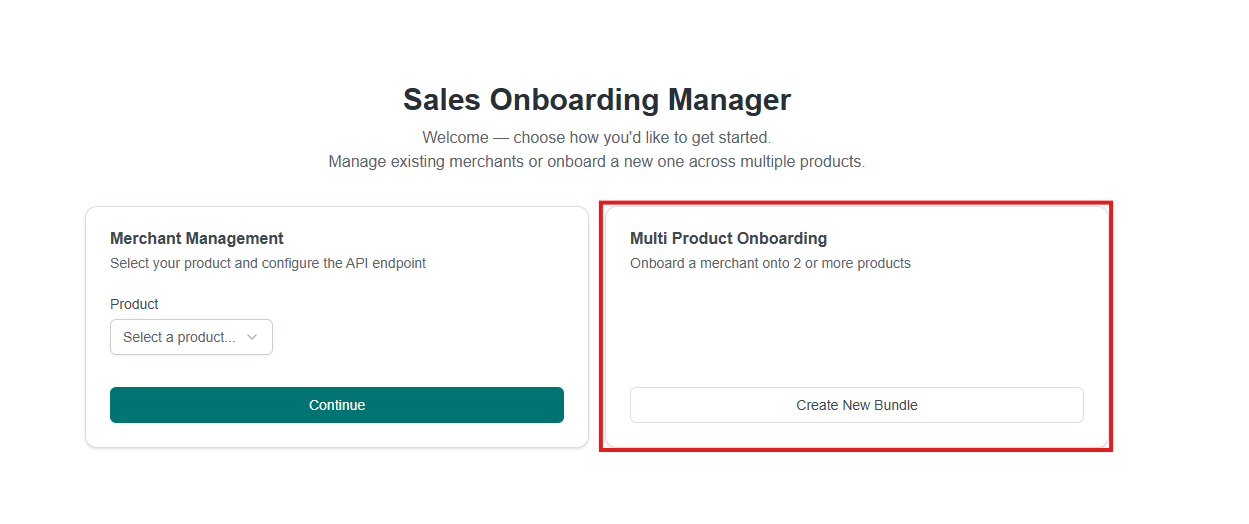
Create New Bundle initiates multi product onboarding for a merchant purchasing two or more products. Merchant Management remains the route for a single product.
Net new customer bundles
For a customer who has not yet been onboarded, the products within the bundle determine the single credit risk workflow applied — that of the highest risk product the bundle contains.
How the bundle is onboarded
| Step | Actor | Outcome |
|---|---|---|
| 1 | Sales | Selects the products purchased by the customer and creates the bundle |
| 2 | PaySuite | Matches the selected products against a configured bundle and resolves the applicable credit risk workflow |
| 3 | PaySuite | Creates one merchant per product, each with its own location, and links them as a single bundle |
| 4 | Customer | Completes a single onboarding journey covering pricing, data capture, credit risk assessment and KYC |
| 5 | PaySuite | Applies the details captured during that journey to every merchant in the bundle |
| 6 | PaySuite | Reports status changes for each merchant through the existing webhook events |
A separate merchant is created for each product because each product maintains its own account, pricing and reporting. Multi product onboarding removes the repetition of the journey, not the separate merchant records.
Where the customer has previously been approved offline, the bundle is treated as pre-approved and the credit risk step is omitted entirely. Refer to Pre-approved bundles.
Locations and stores
Each product within the bundle maintains its own locations and stores. When a location is added, the product to which it belongs is selected from the products in the bundle. A customer operating EPOS at one venue and Qikserve at another therefore has each location assigned to the appropriate product.
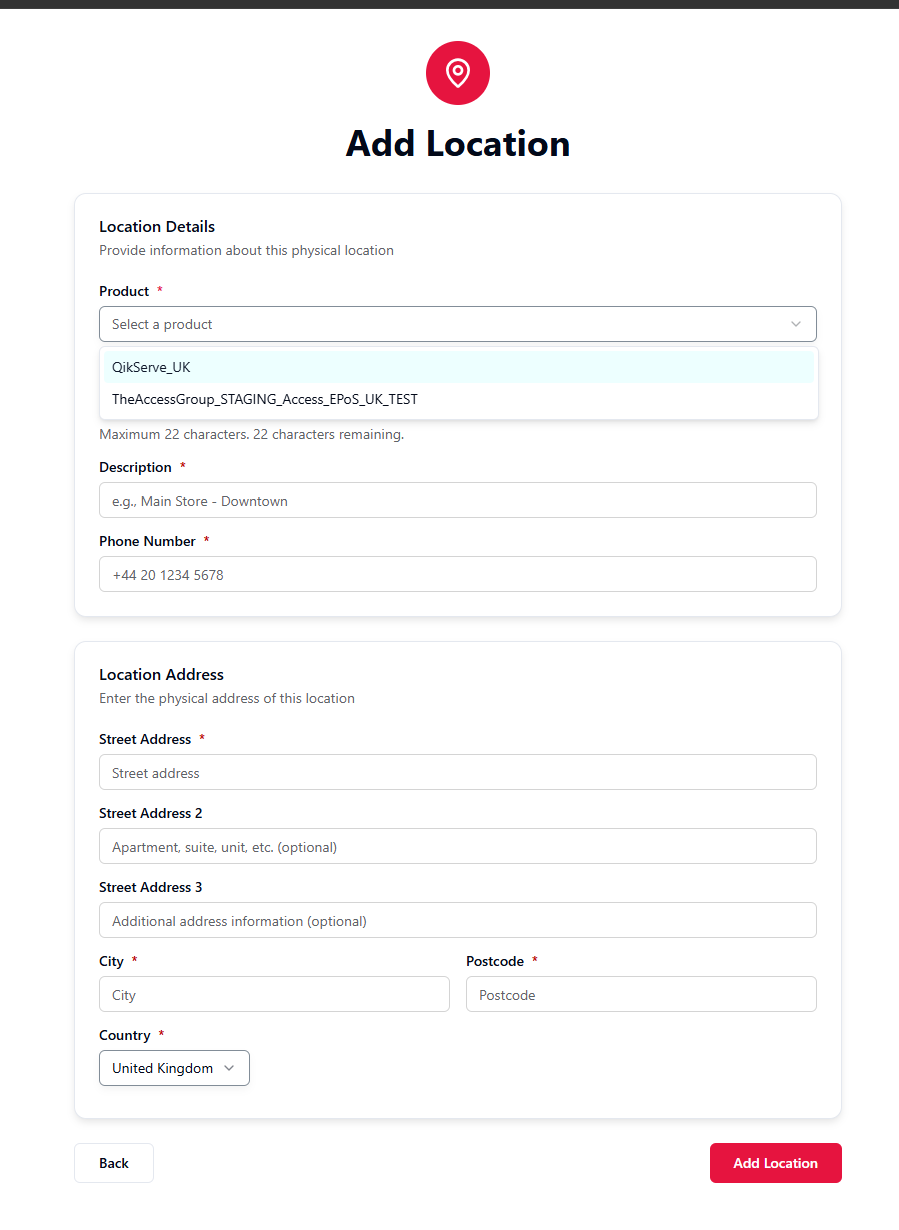
In addition to the product, each location records the following:
| Field | Description |
|---|---|
| Product | The product within the bundle to which this location belongs |
| Shopper statement | The text displayed on the shopper's bank statement — maximum 22 characters |
| Description | A name for the location, for example Main Store - Downtown |
| Phone number | The contact number for the location |
| Location address | The physical address of the site, including city, postcode and country |
Because stores are recorded per product, each product is configured with only the sales channels used by its own stores.
Where the stores form is not completed during sales-led onboarding, the sales channels subsequently requested from the customer are derived from the union of the DivisionConfig settings across all products in the bundle. Any channel enabled on any product in the bundle is therefore enabled for the bundle as a whole.
For example, where EPOS collects Point of Sale and Accommodation collects Ecommerce and MOTO, a bundle containing both products defaults to all three channels, and the customer is asked to provide Ecommerce, MOTO and Point of Sale store details, including for products that do not require them.
Completing the stores form restricts each product to the channels it genuinely requires.
Upselling an onboarded customer
A bundle need not be created at the outset. Once a customer has been fully onboarded and activated on one product, they may be upsold at any subsequent point: an additional product is sold, and a further merchant is created for that product. The customer retains the merchant already held for the first product and acquires an additional merchant for each product added. All merchants are then linked as a single bundle.
As the customer has already been assessed, the upsell does not commence from the beginning. The business details, the account holder and the KYC already held are carried forward, and a new credit risk assessment is required only where the products being added carry a higher risk than the workflow under which the customer was originally assessed.
Prerequisites
An upsell is accepted only where the customer has completed onboarding on the products already held:
| Prerequisite | Rationale |
|---|---|
| Data capture complete on every existing product | A customer still undergoing onboarding holds no finalised details to carry forward. |
| Credit risk approved on every existing product | A customer who has not yet been approved, or who has been rejected, may not acquire further products. |
| KYC active on the existing account holder | The new product is attached to the approved account holder, which must therefore exist. |
The upsell journey
| Step | Actor | Outcome |
|---|---|---|
| 1 | Customer | Is fully onboarded and accepting payments on the first product |
| 2 | Sales | Sells an additional product and initiates an upsell against the customer's existing merchant |
| 3 | PaySuite | Creates a further merchant for each added product, copying the business details from the existing merchant |
| 4 | PaySuite | Re-resolves the bundle from the products already held together with the products being added, and links all merchants under it |
| 5 | PaySuite | Compares the workflow required by the bundle against the workflow under which the customer was assessed |
| 6 | Customer | Completes a new assessment only where one is required; otherwise no further information is requested |
| 7 | PaySuite | Attaches the new products to the existing approved account holder and activates payments |
As the new merchants are attached to the customer's existing account holder, KYC is never repeated during an upsell. Only credit risk may require re-assessment.
Higher risk, lower risk, and stale assessments
Whether an upsell requires a new assessment is determined by comparing the workflow now required by the bundle against the workflow under which the customer was previously assessed. Three cases apply.
| Case | Behaviour | Action required from the customer |
|---|---|---|
| Added product is of lower or equivalent risk | The workflow required by the bundle is the workflow the customer already holds. The existing approval is carried onto the new products unchanged, retaining the same assessment, approval and original assessment date. | None. The products are added against the approval already held. |
| Added product is of higher risk | The bundle now requires a higher risk workflow than that under which the customer was assessed, and a new assessment is therefore raised at the higher level. | Complete a single credit risk collection form, prefilled from the details previously provided. One form covers every product being added. |
| Existing assessment is out of date | Even where the workflow is unchanged, an assessment older than 6 months is not carried forward and a new assessment is raised instead. | Complete a new credit risk collection form, as above. |
Adding a lower-risk product
No further action is required from the customer. The existing approval is extended to the new products, which are activated on the basis of that original approval.
As the original assessment date is retained alongside the approval, the six-month period continues to run from the original assessment. An upsell does not reset this period.
Adding a higher-risk product
Only the products being added are dependent on the new assessment. The customer's existing product is neither re-assessed nor interrupted: its approval remains in force and the customer continues to trade on it while the new assessment is carried out. The added products are activated once the outcome is returned.
Where a customer already holds several products, all must be approved before an upsell is accepted. Refer to Prerequisites. The comparison is then made against the workflow under which those existing products were assessed.
Pre-approved bundles
A pre-approved customer is a customer whom PaySuite Risk and Compliance has already approved offline, recorded against the division to which they belong. Such customers bypass the credit risk assessment during onboarding, as the assessment has already been completed.
A pre-approved bundle extends this principle to multi product onboarding: where the customer is an active pre-approved customer on the division that carries the bundle's credit risk workflow, the bundle as a whole is treated as pre-approved.
| Standard bundle | Pre-approved bundle | |
|---|---|---|
| Credit risk data capture | The customer completes the collection form for the bundle's workflow | Omitted; not presented to the customer |
| External credit risk assessment | Performed, with the products awaiting the outcome | Not performed |
| Credit risk outcome | Approved, rejected or referred for review | Recorded as approved for every product in the bundle |
| KYC | Required | Required |
A pre-approved bundle omits the credit risk step only; the remainder of the journey is unaffected. The customer must still complete business data capture and Know Your Customer verification before the products can accept payments.
Pre-approval applies identically on both routes. A net new bundle and an upsell are each validated against the customer's pre-approved status, and an upsell into a pre-approved bundle therefore raises no new assessment, even where a higher risk product would otherwise require one.
Bundles are configured, not calculated
A bundle is not derived dynamically from the products being sold. Each supported combination is configured in advance, comprising the products it covers, the country to which it applies, and the single credit risk workflow used. The products selected must correspond exactly to a configured bundle:
- A combination that matches no configured bundle cannot be onboarded as a bundle.
- A combination that matches more than one configured bundle is rejected as ambiguous.
Only combinations that have been configured as a bundle are currently supported, and only in the countries against which they are configured. Any other combination of products is not yet available through multi product onboarding, and such customers are onboarded on a per-product basis in the interim.
To request support for an additional combination, contact the OnAccess team.