Embedded Payments
Embedded payment procesing capability into SoftCo products can be done using a variety of Stripe options. For a comprehensive list of options check out the Stripe documentation.
Below are some examples of processing payments for different use cases.
One-off payment using Stripe hosted page
Request example
curl --location 'https://api.stripe.com/v1/checkout/sessions' \
--header 'Stripe-Account: {{STRIPE_CONNECT_ACCOUNT_ID}}' \
--header 'Content-Type: application/x-www-form-urlencoded' \
--header 'Authorization: Basic {{STRIPE_SECRET_KEY}}' \
--data-urlencode 'line_items%5B0%5D%5Bprice_data%5D%5Bcurrency%5D=gbp' \
--data-urlencode 'line_items%5B0%5D%5Bprice_data%5D%5Bproduct_data%5D%5Bname%5D=T-shirt' \
--data-urlencode 'line_items%5B0%5D%5Bprice_data%5D%5Bunit_amount%5D=1001' \
--data-urlencode 'line_items%5B0%5D%5Bquantity%5D=1' \
--data-urlencode 'mode=payment' \
--data-urlencode 'success_url=https://localhost/return_success' \
--data-urlencode 'cancel_url=https://localhost/return_cancel'
Response
{
  "id": "cs_test_a13igLLOsCpIns72Sjxz510NElRmN7YcMQXFL1HZtHgMeidwvML3XH3UwL",
  ...
  "url": "https://checkout.stripe.com/c/pay/cs_test_a13igLLOsCpIns72Sjxz510NElRmN7YcMQXFL1HZtHgMeidwvML3XH3UwL#..."
}
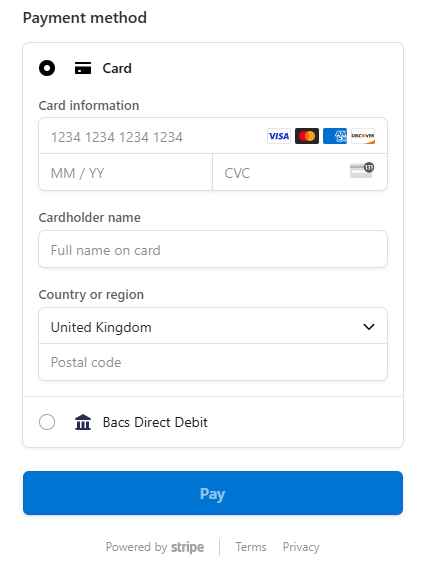
Record the id and redirect the customer to the url to begin payment processing.
One-off payment with payment method storage using Stripe hosted page
Request example
curl --location 'https://api.stripe.com/v1/checkout/sessions' \
--header 'Stripe-Account: {{STRIPE_CONNECT_ACCOUNT_ID}}' \
--header 'Content-Type: application/x-www-form-urlencoded' \
--header 'Authorization: Basic {{STRIPE_SECRET_KEY}}' \
--data-urlencode 'line_items%5B0%5D%5Bprice_data%5D%5Bcurrency%5D=gbp' \
--data-urlencode 'line_items%5B0%5D%5Bprice_data%5D%5Bproduct_data%5D%5Bname%5D=T-shirt' \
--data-urlencode 'line_items%5B0%5D%5Bprice_data%5D%5Bunit_amount%5D=1001' \
--data-urlencode 'line_items%5B0%5D%5Bquantity%5D=1' \
--data-urlencode 'mode=payment' \
--data-urlencode 'success_url=https://localhost/return_success' \
--data-urlencode 'cancel_url=https://localhost/return_cancel' \
--data-urlencode 'saved_payment_method_options%5Bpayment_method_save%5D=enabled' \
--data-urlencode 'customer_creation=always' \
--data-urlencode 'payment_intent_data%5Bsetup_future_usage%5D=off_session'
Response
{
  "id": "cs_test_a13igLLOsCpIns72Sjxz510NElRmN7YcMQXFL1HZtHgMeidwvML3XH3UwL",
  ...
  "url": "https://checkout.stripe.com/c/pay/cs_test_a13igLLOsCpIns72Sjxz510NElRmN7YcMQXFL1HZtHgMeidwvML3XH3UwL#..."
}
Record the id and redirect the customer to the url to begin payment processing.
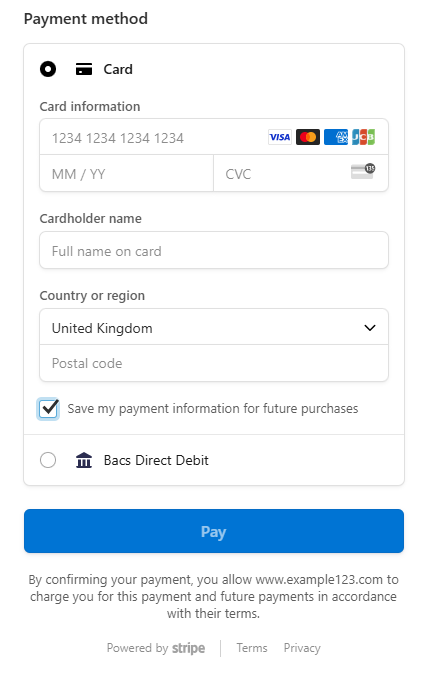
After the payment has been processed successfully, the payment intent must be obtained using the id to then store the customer and payment_method details for future payment request.
Save a payment method using Stripe hosted page
Request example
curl --location 'https://api.stripe.com/v1/checkout/sessions' \
--header 'Stripe-Account: {{STRIPE_CONNECT_ACCOUNT_ID}}' \
--header 'Content-Type: application/x-www-form-urlencoded' \
--header 'Authorization: Basic {{STRIPE_SECRET_KEY}}' \
--data-urlencode 'mode=setup' \
--data-urlencode 'success_url=https://localhost/return_success' \
--data-urlencode 'cancel_url=https://localhost/return_cancel' \
--data-urlencode 'customer_creation=always' \
--data-urlencode 'currency=gbp'
Response
{
  "id": "cs_test_a13igLLOsCpIns72Sjxz510NElRmN7YcMQXFL1HZtHgMeidwvML3XH3UwL",
  ...
  "url": "https://checkout.stripe.com/c/pay/cs_test_a13igLLOsCpIns72Sjxz510NElRmN7YcMQXFL1HZtHgMeidwvML3XH3UwL#..."
}
Record the id and redirect the customer to the url to begin payment processing.
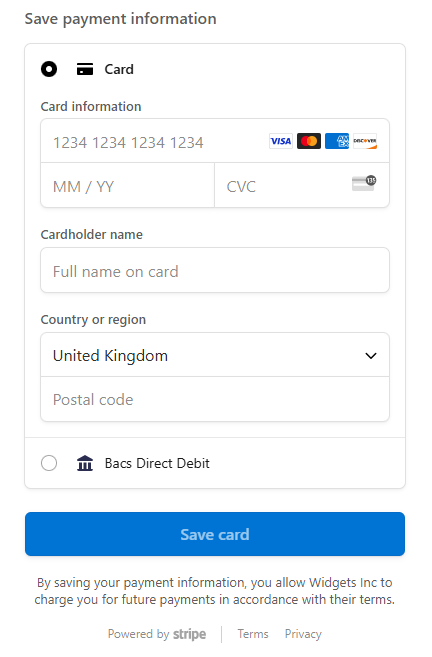
After the payment has been processed successfully, the payment intent must be obtained using the id to then store the customer and payment_method details for future payment request.
Process a merchant initiated payment using the Stripe API
Request example
curl --location 'https://api.stripe.com/v1/payment_intents' \
--header 'Stripe-Account: {{STRIPE_CONNECT_ACCOUNT_ID}}' \
--header 'Content-Type: application/x-www-form-urlencoded' \
--header 'Authorization: Basic {{STRIPE_SECRET_KEY}}' \
--data-urlencode 'amount=1001' \
--data-urlencode 'currency=gbp' \
--data-urlencode 'customer={{CUSTOMER_ID}}' \
--data-urlencode 'payment_method={{PAYMENT_METHOD}}' \
--data-urlencode 'off_session=true' \
--data-urlencode 'confirm=true'
Response
{
  "id": "pi_3RolmFwfxxR2USzW9INte3np",
  ...
  "status": "succeeded"
}
Record the id and status and handle webhook events to reconcile the payment.